Obsidian - Why I Love IT
- obsidian is the Best notes application in the world. Go download it: https://obsidian.md/
The Setup
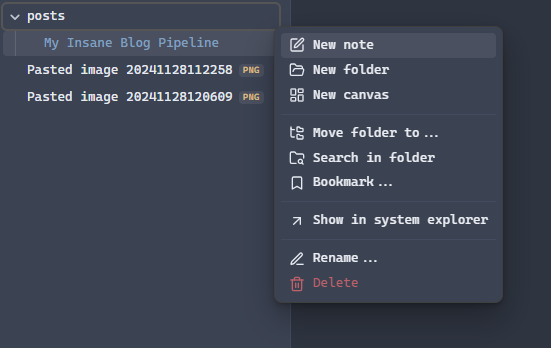
- Create a new folder labeled posts. This is where you will add your blog posts
- ….that’s all you have to do
- Actually…wait….find out where your Obsidian directories are. Right click your posts folder and choose show in system explorer
- You’ll need this directory in upcoming steps.
Setting up Hugo
Prerequisites
- Install Git: https://github.com/git-guides/install-git
- Install Go: https://go.dev/dl/
Install Hugo
Link: https://gohugo.io/installation/
Create a new site
## Verify Hugo works
hugo version

## Create a new site

hugo new site websitename
cd websitename
Download a Hugo Theme
- Find themes from this link: https://themes.gohugo.io/
- follow the theme instructions on how to download. The BEST option is to install as a git submodule
## Initialize a git repository (Make sure you are in your Hugo website directory)

git init

## Set global username and email parameters for git

git config --global user.name "Your Name"
git config --global user.email "your.email@example.com"


## Install a theme (we are installing the Terminal theme here). Once downloaded it should be in your Hugo themes folder
## Find a theme ---> https://themes.gohugo.io/

git submodule add -f https://github.com/panr/hugo-theme-terminal.git themes/terminal
Adjust Hugo settings
- Most themes you download will have an example configuration you can use. This is usually the best way to make sure Hugo works well and out of the box.
- For the Terminal theme, they gave this example config below.
- We will edit the hugo.toml file to make these changes. —→
nano hugo.toml(Linux/Mac) ornotepad hugo.toml(Windows) orcode hugo.toml(All platforms)
baseurl = "/"
languageCode = "en-us"
# Add it only if you keep the theme in the `themes` directory.
# Remove it if you use the theme as a remote Hugo Module.
theme = "terminal"
paginate = 5

[params]
  # dir name of your main content (default is `content/posts`).
  # the list of set content will show up on your index page (baseurl).
  contentTypeName = "posts"

  # if you set this to 0, only submenu trigger will be visible
  showMenuItems = 2

  # show selector to switch language
  showLanguageSelector = false

  # set theme to full screen width
  fullWidthTheme = false

  # center theme with default width
  centerTheme = false

  # if your resource directory contains an image called `cover.(jpg|png|webp)`,
  # then the file will be used as a cover automatically.
  # With this option you don't have to put the `cover` param in a front-matter.
  autoCover = true

  # set post to show the last updated
  # If you use git, you can set `enableGitInfo` to `true` and then post will automatically get the last updated
  showLastUpdated = false

  # Provide a string as a prefix for the last update date. By default, it looks like this: 2020-xx-xx [Updated: 2020-xx-xx] :: Author
  # updatedDatePrefix = "Updated"

  # whether to show a page's estimated reading time
  # readingTime = false # default

  # whether to show a table of contents
  # can be overridden in a page's front-matter
  # Toc = false # default

  # set title for the table of contents
  # can be overridden in a page's front-matter
  # TocTitle = "Table of Contents" # default


[params.twitter]
  # set Twitter handles for Twitter cards
  # see https://developer.twitter.com/en/docs/tweets/optimize-with-cards/guides/getting-started#card-and-content-attribution
  # do not include @
  creator = ""
  site = ""

[languages]
  [languages.en]
    languageName = "English"
    title = "Terminal"

    [languages.en.params]
      subtitle = "A simple, retro theme for Hugo"
      owner = ""
      keywords = ""
      copyright = ""
      menuMore = "Show more"
      readMore = "Read more"
      readOtherPosts = "Read other posts"
      newerPosts = "Newer posts"
      olderPosts = "Older posts"
      missingContentMessage = "Page not found..."
      missingBackButtonLabel = "Back to home page"
      minuteReadingTime = "min read"
      words = "words"

      [languages.en.params.logo]
        logoText = "Terminal"
        logoHomeLink = "/"

      [languages.en.menu]
        [[languages.en.menu.main]]
          identifier = "about"
          name = "About"
          url = "/about"
        [[languages.en.menu.main]]
          identifier = "showcase"
          name = "Showcase"
          url = "/showcase"
Test Hugo
## Verify Hugo works with your theme by running this command

hugo server -t themename
Walking Through the Steps
NOTE: There is a MEGA SCRIPT later in this blog that will do everything in one go.
Syncing Obsidian to Hugo
Windows
robocopy sourcepath destination path /mirMac/Linux
rsync -av --delete "sourcepath" "destinationpath"Add some frontmatter
---
title: blogtitle
date: 2024-11-06
draft: false
tags:
  - tag1
  - tag2
---
Transfer Images from Obsidian to Hugo
const fs = require('fs');
const path = require('path');
// Paths
const postsDir = path.join("C:", "Users", "pradeep", "Documents", "specwiseblog", "content", "posts");
const attachmentsDir = path.join("C:", "Users", "pradeep", "Documents", "Obsidian Vault", "attachments");
const staticImagesDir = path.join("C:", "Users", "pradeep", "Documents", "specwiseblog", "static", "images");
// Ensure static images directory exists
if (!fs.existsSync(staticImagesDir)) {
fs.mkdirSync(staticImagesDir, { recursive: true });
console.log(`Created missing directory: ${staticImagesDir}`);
}
// Function to process Markdown files
fs.readdir(postsDir, (err, files) => {
if (err) {
console.error("Error reading posts directory:", err);
return;
}
files.forEach((filename) => {
if (filename.endsWith(".md")) {
const filepath = path.join(postsDir, filename);
fs.readFile(filepath, "utf-8", (err, content) => {
if (err) {
console.error("Error reading file:", filepath, err);
return;
}
// Step 2: Find all image links in the format 
const imageMatches = content.match(/\[\[([^\]]+\.(png|jpg|jpeg|gif|svg))\]\]/gi); // Support multiple image extensions
if (imageMatches) {
imageMatches.forEach((match) => {
const imageName = match.replace(/\[\[|\]\]/g, ""); // Remove brackets
const markdownImage = `})`;
content = content.replace(match, markdownImage);
// Step 4: Copy the image if it exists
const imageSource = path.join(attachmentsDir, imageName);
const imageDest = path.join(staticImagesDir, imageName);
if (fs.existsSync(imageSource)) {
fs.copyFile(imageSource, imageDest, (err) => {
if (err) {
console.error("Error copying file:", imageSource, "to", imageDest, err);
} else {
console.log(`Copied: ${imageName}`);
}
});
} else {
console.warn(`Image not found: ${imageSource}`);
}
});
// Step 5: Write the updated content back to the file
fs.writeFile(filepath, content, "utf-8", (err) => {
if (err) {
console.error("Error writing file:", filepath, err);
} else {
console.log(`Updated file: ${filepath}`);
}
});
} else {
console.log(`No images found in: ${filepath}`);
}
});
} else {
console.log(`Skipping non-Markdown file: ${filename}`);
}
});
});
console.log("Markdown files processed and images copied successfully.");Setup GitHub
- Get yourself an account
- Then create a repo
Authenticate yourself
## Generate an SSH key (Mac/Linux/Windows)

ssh-keygen -t rsa -b 4096 -C "your_email@example.com"
Push to GitHub
# Step 8: Push the public folder to the hostinger branch using subtree split and force push
echo "Deploying to GitHub Hostinger..."
git subtree split --prefix public -b hostinger-deploy
git push origin hostinger-deploy:hostinger --force
git branch -D hostinger-deploy
The Mega Script
Windows (Powershell)
# PowerShell Script for Windows

# Set variables for Obsidian to Hugo copy
$sourcePath = "C:\Users\path\to\obsidian\posts"
$destinationPath = "C:\Users\path\to\hugo\posts"

# Set Github repo
$myrepo = "reponame"

# Set error handling
$ErrorActionPreference = "Stop"
Set-StrictMode -Version Latest

# Change to the script's directory
$ScriptDir = Split-Path -Parent $MyInvocation.MyCommand.Definition
Set-Location $ScriptDir

# Check for required commands
$requiredCommands = @('git', 'hugo')

# Check for Python command (python or python3)
if (Get-Command 'python' -ErrorAction SilentlyContinue) {
    $pythonCommand = 'python'
} elseif (Get-Command 'python3' -ErrorAction SilentlyContinue) {
    $pythonCommand = 'python3'
} else {
    Write-Error "Python is not installed or not in PATH."
    exit 1
}

foreach ($cmd in $requiredCommands) {
    if (-not (Get-Command $cmd -ErrorAction SilentlyContinue)) {
        Write-Error "$cmd is not installed or not in PATH."
        exit 1
    }
}

# Step 1: Check if Git is initialized, and initialize if necessary
if (-not (Test-Path ".git")) {
    Write-Host "Initializing Git repository..."
    git init
    git remote add origin $myrepo
} else {
    Write-Host "Git repository already initialized."
    $remotes = git remote
    if (-not ($remotes -contains 'origin')) {
        Write-Host "Adding remote origin..."
        git remote add origin $myrepo
    }
}

# Step 2: Sync posts from Obsidian to Hugo content folder using Robocopy
Write-Host "Syncing posts from Obsidian..."

if (-not (Test-Path $sourcePath)) {
    Write-Error "Source path does not exist: $sourcePath"
    exit 1
}

if (-not (Test-Path $destinationPath)) {
    Write-Error "Destination path does not exist: $destinationPath"
    exit 1
}

# Use Robocopy to mirror the directories
$robocopyOptions = @('/MIR', '/Z', '/W:5', '/R:3')
$robocopyResult = robocopy $sourcePath $destinationPath @robocopyOptions

if ($LASTEXITCODE -ge 8) {
    Write-Error "Robocopy failed with exit code $LASTEXITCODE"
    exit 1
}

# Step 3: Process Markdown files with Python script to handle image links
Write-Host "Processing image links in Markdown files..."
if (-not (Test-Path "images.py")) {
    Write-Error "Python script images.py not found."
    exit 1
}

# Execute the Python script
try {
    & $pythonCommand images.py
} catch {
    Write-Error "Failed to process image links."
    exit 1
}

# Step 4: Build the Hugo site
Write-Host "Building the Hugo site..."
try {
    hugo
} catch {
    Write-Error "Hugo build failed."
    exit 1
}

# Step 5: Add changes to Git
Write-Host "Staging changes for Git..."
$hasChanges = (git status --porcelain) -ne ""
if (-not $hasChanges) {
    Write-Host "No changes to stage."
} else {
    git add .
}

# Step 6: Commit changes with a dynamic message
$commitMessage = "New Blog Post on $(Get-Date -Format 'yyyy-MM-dd HH:mm:ss')"
$hasStagedChanges = (git diff --cached --name-only) -ne ""
if (-not $hasStagedChanges) {
    Write-Host "No changes to commit."
} else {
    Write-Host "Committing changes..."
    git commit -m "$commitMessage"
}

# Step 7: Push all changes to the main branch
Write-Host "Deploying to GitHub Master..."
try {
    git push origin master
} catch {
    Write-Error "Failed to push to Master branch."
    exit 1
}

# Step 8: Push the public folder to the hostinger branch using subtree split and force push
Write-Host "Deploying to GitHub Hostinger..."

# Check if the temporary branch exists and delete it
$branchExists = git branch --list "hostinger-deploy"
if ($branchExists) {
    git branch -D hostinger-deploy
}

# Perform subtree split
try {
    git subtree split --prefix public -b hostinger-deploy
} catch {
    Write-Error "Subtree split failed."
    exit 1
}

# Push to hostinger branch with force
try {
    git push origin hostinger-deploy:hostinger --force
} catch {
    Write-Error "Failed to push to hostinger branch."
    git branch -D hostinger-deploy
    exit 1
}

# Delete the temporary branch
git branch -D hostinger-deploy

Write-Host "All done! Site synced, processed, committed, built, and deployed."
Linux/Mac (BASH)
#!/bin/bash
set -euo pipefail

# Change to the script's directory
SCRIPT_DIR="$(cd "$(dirname "${BASH_SOURCE[0]}")" && pwd)"
cd "$SCRIPT_DIR"

# Set variables for Obsidian to Hugo copy
sourcePath="/Users/path/to/obsidian/posts"
destinationPath="/Users/path/to/hugo/posts"

# Set GitHub Repo
myrepo="reponame"

# Check for required commands
for cmd in git rsync python3 hugo; do
    if ! command -v $cmd &> /dev/null; then
        echo "$cmd is not installed or not in PATH."
        exit 1
    fi
done

# Step 1: Check if Git is initialized, and initialize if necessary
if [ ! -d ".git" ]; then
    echo "Initializing Git repository..."
    git init
    git remote add origin $myrepo
else
    echo "Git repository already initialized."
    if ! git remote | grep -q 'origin'; then
        echo "Adding remote origin..."
        git remote add origin $myrepo
    fi
fi

# Step 2: Sync posts from Obsidian to Hugo content folder using rsync
echo "Syncing posts from Obsidian..."

if [ ! -d "$sourcePath" ]; then
    echo "Source path does not exist: $sourcePath"
    exit 1
fi

if [ ! -d "$destinationPath" ]; then
    echo "Destination path does not exist: $destinationPath"
    exit 1
fi

rsync -av --delete "$sourcePath" "$destinationPath"

# Step 3: Process Markdown files with Python script to handle image links
echo "Processing image links in Markdown files..."
if [ ! -f "images.py" ]; then
    echo "Python script images.py not found."
    exit 1
fi

if ! python3 images.py; then
    echo "Failed to process image links."
    exit 1
fi

# Step 4: Build the Hugo site
echo "Building the Hugo site..."
if ! hugo; then
    echo "Hugo build failed."
    exit 1
fi

# Step 5: Add changes to Git
echo "Staging changes for Git..."
if git diff --quiet && git diff --cached --quiet; then
    echo "No changes to stage."
else
    git add .
fi

# Step 6: Commit changes with a dynamic message
commit_message="New Blog Post on $(date +'%Y-%m-%d %H:%M:%S')"
if git diff --cached --quiet; then
    echo "No changes to commit."
else
    echo "Committing changes..."
    git commit -m "$commit_message"
fi

# Step 7: Push all changes to the main branch
echo "Deploying to GitHub Main..."
if ! git push origin main; then
    echo "Failed to push to main branch."
    exit 1
fi

# Step 8: Push the public folder to the hostinger branch using subtree split and force push
echo "Deploying to GitHub Hostinger..."
if git branch --list | grep -q 'hostinger-deploy'; then
    git branch -D hostinger-deploy
fi

if ! git subtree split --prefix public -b hostinger-deploy; then
    echo "Subtree split failed."
    exit 1
fi

if ! git push origin hostinger-deploy:hostinger --force; then
    echo "Failed to push to hostinger branch."
    git branch -D hostinger-deploy
    exit 1
fi

git branch -D hostinger-deploy

echo "All done! Site synced, processed, committed, built, and deployed."